Transactions
Every trade, every closed position, and whether it beat the index
The transactions page keeps your full history of buys, sales, dividends and deposits. Sales are shown as closed positions: matched to their purchases first-in, first-out, with the realized gain, how long you held the shares, and what the same money would have made in the S&P 500.
FIFO matching
Each sale uses up the oldest shares first, the IRS default when you don't identify specific lots.
Each sale vs the S&P 500
The cost of the matched lots “buys” SPY on the purchase dates and “sells” it on the sale date.
Fix and filter
Filter by company, correct a quantity, price or fee, and see which lots are still open.
What it does
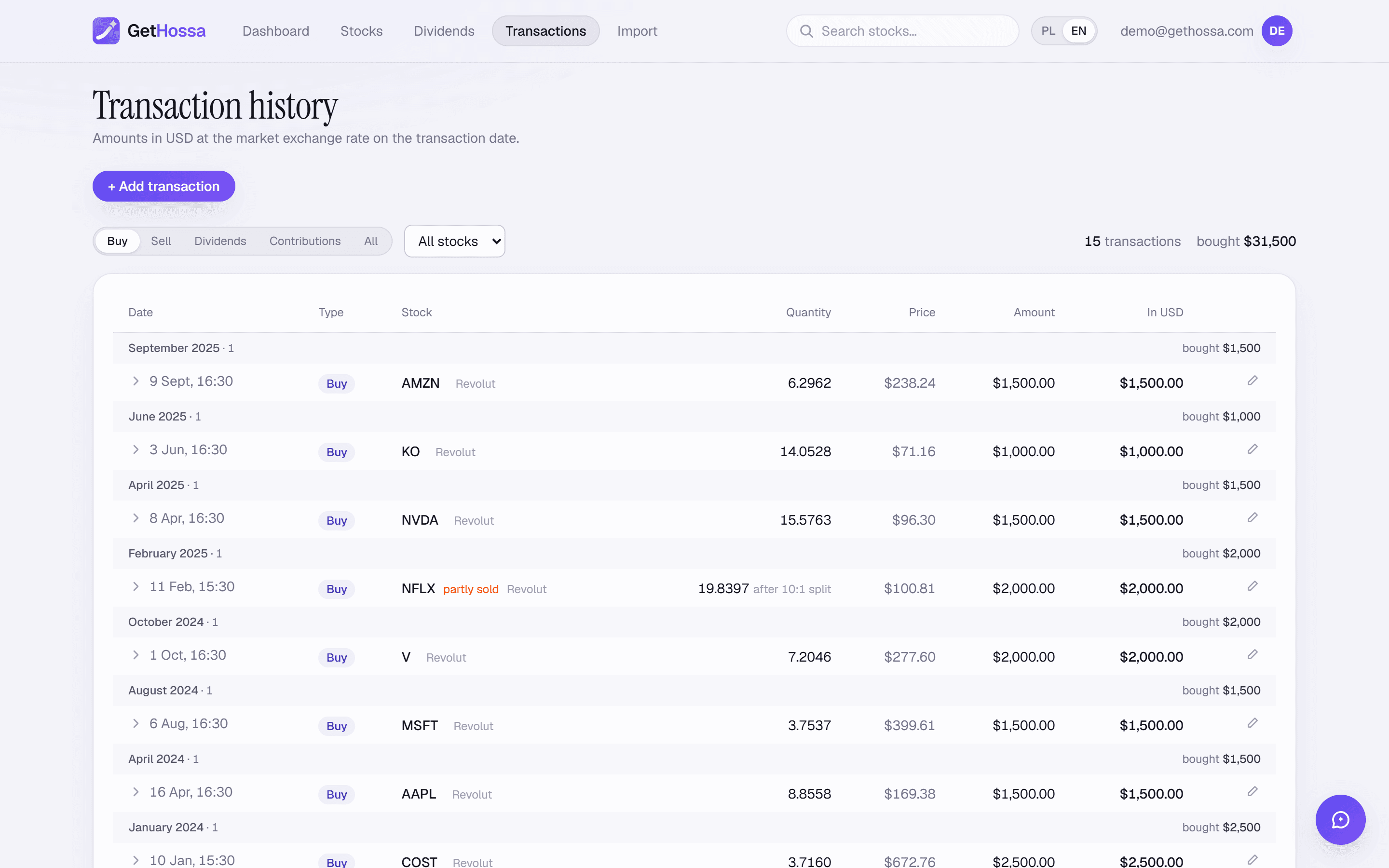
The transactions page is your complete trade log, with tabs for Buys, Sales, Dividends, Deposits and All, a filter by company, and running totals for what you bought, sold and received. Amounts are shown in the original currency and in dollars at the exchange rate of the trade date.
The Sales tab turns every sale into a closed position. At the top you see how many trades you closed, the total realized result, how many were winners ("7 of 10"), total proceeds, and your combined lead over the S&P 500. Each closed position shows:
- the number of shares and how long you held them,
- the cost of the purchases it closed (first-in, first-out) and the average price,
- the sale proceeds and sale price,
- the realized gain or loss in dollars and as a percentage, plus the result in the stock's own currency when it's different,
- a bar comparing the sale with the same money in the S&P 500 over the same period,
- the individual purchase lots the sale used up.
On the Buys tab, each purchase is marked open, partially sold or sold, and expands to show which sales closed it.
How it works
- Your history comes in from an imported statement or manual entries (see broker import).
- Sales are matched FIFO. A sale of 50 shares first uses the oldest unsold shares of the same stock; if the oldest lot had 30, the next 20 come from the following purchase.
- The result is calculated in dollars. Proceeds after fees minus the cost of the matched lots, including fees. For stocks quoted in another currency, both sides are converted at the rate on their own dates, so the result includes the currency effect.
- The index comparison runs per lot. Each matched purchase's cost "buys" S&P 500 units on its purchase date, and all of them are "sold" on the sale date.
Example
You bought 30 shares at $100 in March 2024 and 40 at $120 in January 2025, then sold 50 at $150 in September 2026. FIFO matches 30 shares at $100 and 20 at $120, a cost of $5,400. Proceeds are $7,500, so the realized gain is $2,100 (+38.9%). If $3,000 in SPY bought in March 2024 plus $2,400 bought in January 2025 would have been worth $7,100 on the sale date, your lead over the index on this trade is $400.
Who it's for
- Investors who want to know whether their sells, not just their buys, were good decisions.
- Anyone reviewing a year's realized gains before their brokerage's 1099-B arrives.
- People correcting their history: you can edit the quantity, price or fee of any purchase or sale (a correction to an imported trade survives a re-import), and delete trades you entered by hand.
Details and limits
- FIFO only. If you sell specific lots or use average cost for mutual funds, your broker's figures will differ.
- Holding period is an average of the matched lots, weighted by shares. A sale that spans lots on both sides of one year mixes short- and long-term gains; check the lot list.
- No wash-sale adjustments. Disallowed losses and basis adjustments aren't applied.
- Stock splits are applied. Purchases made before a split are restated in today's share count, using split dates from Yahoo Finance, so a 4-for-1 split doesn't break the FIFO match. The cost of each lot stays the same.
- Incomplete history. If a sale is larger than the purchases recorded in GetHossa, it's flagged and the result covers only the matched part.
- Exchange rates. For foreign stocks, GetHossa uses the market rate on each trade date, which can differ from the rate your broker used.
The formulas are on the methodology page. For the rules around losses, see tax-loss harvesting and the wash sale rule. This view is for information only; you file from your broker's tax forms, and nothing here is tax advice.
Frequently asked questions
Why FIFO and not specific identification?+
FIFO is what the IRS assumes when you don't identify specific lots, and it can be applied consistently to any import or manual history. If you chose specific lots at your broker, its realized gains will differ from GetHossa's.
Can I use this to file my taxes?+
Use it to review and understand your year. Your brokerage's 1099-B is what you file from, and it accounts for wash sales and lot choices that GetHossa doesn't model.
What does “lead over the S&P 500” mean for a single sale?+
GetHossa takes the cost of each purchase lot the sale closed, invests it in SPY (with dividends) on that purchase's date, and sells it all on your sale date. The lead is your realized gain minus what the index would have made.
Why is a sale marked as incomplete?+
Because GetHossa doesn't have enough earlier purchases to match it, usually because an older statement wasn't imported. Import the missing period or add the purchase by hand and the result is recalculated.
Try it on your own portfolio
The account is free. Import your history or add trades by hand — you'll see the result right away.
Create account